"Filter: bricks/use_duplicate_content"
محتوای تکراری برای همه کاربران با قابلیت edit_post در دسترس است. از این ویژگی برای کپی کردن هر پست یا صفحه حاوی دادههای Bricks استفاده کنید تا مطمئن شوید که شناسه های Bricks تکراری نیستند. گزینه تکراری برای پست های بدون داده Bricks نیز موجود است و به شما این امکان را میدهد که پست های استاندارد را بدون نیاز به افزونه شخص ثالث کپی کنید.
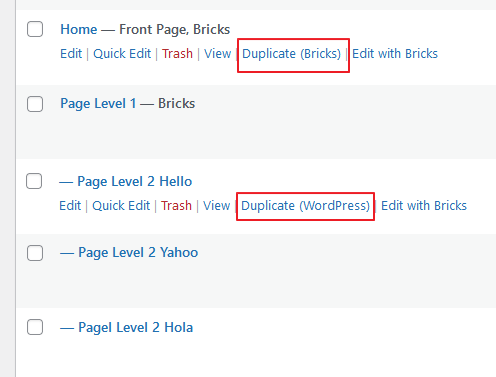
در Bricks > Settings، میتوانید رفتار محتوای تکراری را پیکربندی کنید:

فعال: محتوای تکراری برای همه پست ها در دسترس است. غیرفعال کردن جهانی: محتوای تکراری برای همه پست ها غیرفعال است. غیرفعال کردن دادههای وردپرس: محتوای تکراری برای پست هایی که از دادههای Bricks استفاده نمیکنند غیرفعال است.
این قلاب bricks/use_duplicate_content یک لایه اضافی از سفارشیسازی را فراهم میکند و شما را قادر میسازد تا منطق پیچیدهتری را بر اساس نیازهای خاص خود پیادهسازی کنید. (@since 1.12)
پارامترها
$use (bool)
- The current decision on whether duplicate content is allowed. Default is based on settings and user capabilities.
$post_id (int)
- The ID of the post being checked.
$setting (string)
- The value in Bricks > Settings. Which can be
enable,disabled_all, ordisable_wp
Return Value
This filter expects a boolean value:
trueto allow duplicate content for the particular post.falseto disallow duplicate content for the particular post.
Example Usage
Follow setting logic + ensure the user is admin
add_filter( 'bricks/use_duplicate_content', function( $use, $post_id, $settings ) {
  // Only allow if current has user administrative privileges
  $has_admin_cap = current_user_can( 'manage_options' );

  // Fulfilled the condition
  return $use && $has_admin_cap;
}, 10, 3 );
Follow setting logic + exclude post type for ACF or MB
add_filter( 'bricks/use_duplicate_content', function( $use, $post_id, $settings ) {
  // Check if the post type is 'acf-field-group' or 'mb-post-type
  $post_type = get_post_type( $post_id );
  $exclude_post_types = [ 'acf-field-group', 'mb-post-type' ];

  // Fulfilled the condition
  return $use && ! in_array( $post_type, $exclude_post_types, true );
}, 10, 3 );